Whether you’re designing digital art, designing magazine style scrapbook layouts, restoring photos, or experimenting with mixed-media techniques, these creative software programs provide powerful features that can help bring your creative ideas to life while keeping your costs low or non-existant.
What Is GIMP?
GIMP (GNU Image Manipulation Program) is a free, open-source image editing and digital art application. It has been a favorite among digital artists and designers for years because it offers many of the same capabilities found in more expensive editing software.
GIMP includes:
- Advanced photo editing tools
- Support for layers and masks
- Custom brushes and brush imports
- Graphic design features
- Digital painting capabilities
- Text and typography tools
- Filters and special effects
- Plugin support for extended functionality
Because it is open-source, GIMP is continuously improved by a global community of developers and creators.
Advantages of GIMP
- Completely free to download and use
- No subscription fees
- Available for Windows, Mac, and Linux
- Supports many file formats
- Large community with tutorials and resources
- Excellent for hobbyists and professionals alike
For digital scrapbookers, GIMP provides everything needed to create beautiful page layouts, edit photos, add embellishments, create digital papers, and design printable projects.
What Is Affinity Studio?
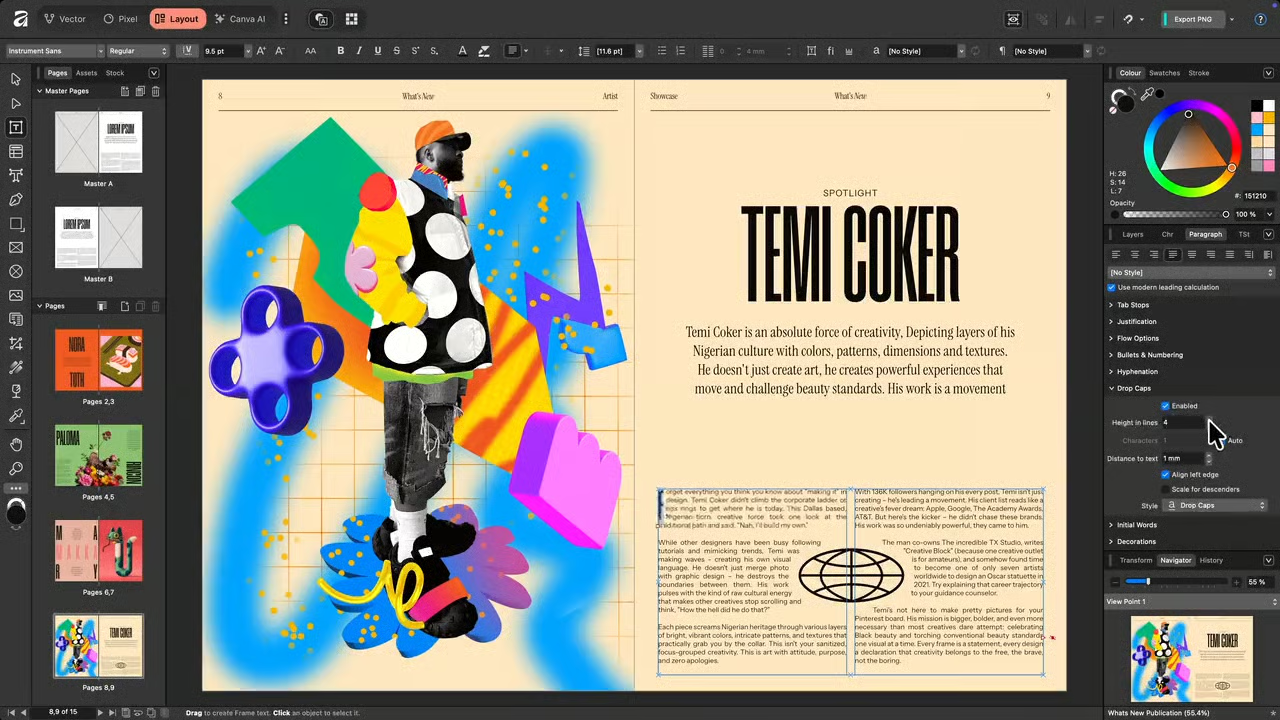
Affinity Studio is a professional-grade photo editing, publishing, digital art application developed by Serif. Unlike subscription-based software, Affinity Photo, now acquired by Canva, uses a forever free purchase model, making it a popular choice among artists who want advanced tools without recurring fees.
Affinity Photo offers:
- Professional photo editing
- Advanced layer management
- Non-destructive editing
- Brush support
- High-end retouching tools
- RAW photo processing
- Digital painting features
- HDR and panorama creation
- Professional print workflows
Many photographers, designers, and illustrators consider Affinity Studio one of the strongest alternatives to Adobe Photoshop, Illustrator and InDesign.
Advantages of Affinity Studio
- Credit card free, zero cost, with no monthly subscription
- Professional-level editing tools
- Fast performance
- Modern and intuitive interface
- Compatible with many Adobe Photoshop resources
- Excellent for photography and fine art projects
For creators who want premium software without committing to an ongoing subscription, Affinity Studio delivers exceptional value.
How Artists Can Use GIMP and Affinity Studio
Both programs are excellent tools for artists working in a variety of styles and mediums.
Digital Painting
Artists can use custom brushes to:
- Create painterly artwork
- Simulate watercolor and acrylic effects
- Sketch concepts and illustrations
- Add texture and depth to compositions
- Build layered mixed-media artwork
Illustration
These applications allow creators to:
- Draw and paint original artwork
- Color line art
- Create fantasy and concept art
- Design book illustrations
- Produce printable art products
Photo Manipulation
Digital artists can combine multiple images, textures, overlays, and brush effects to create imaginative compositions with dramatic visual impact.
How Digital Scrapbookers Can Use These Programs
Digital scrapbookers often need software that can handle multiple layers, embellishments, photos, and text elements. Both GIMP and Affinity Studio are perfect for these creative workflows.
Create Scrapbook Layouts
Design custom scrapbook pages featuring:
- Family photos
- Vacation memories
- Wedding albums
- Heritage projects
- Seasonal layouts
Use Digital Papers and Elements
Scrapbookers can:
- Add patterned papers
- Layer embellishments
- Use stamps and brushes
- Create custom clusters
- Design journaling cards
Customize Templates
Many scrapbook templates can be adapted and personalized by changing colors, photos, text, and decorative elements.
Create Printables
Design and print:
- Greeting cards
- Planners
- Journals
- Wall art
- Invitations
- Memory books
Using Photoshop Brushes in GIMP and Affinity
One major advantage for artists and scrapbookers is the ability to work with brush resources.
Brush collections, including watercolor brushes, smoke brushes, mixed-media brushes, texture brushes, and artistic stamp brushes, can often be imported or converted for use in these applications.
This allows creators to expand their design toolkit without investing in costly software subscriptions.
Popular uses include:
- Painting realistic textures
- Creating atmospheric effects
- Adding artistic backgrounds
- Building mixed-media compositions
- Enhancing digital scrapbook pages
The Financial Benefits of Free and Affordable Creative Software
Creative software subscriptions can add up quickly over time. For hobbyists, new artists, and small creative businesses, reducing software costs can free up resources for other important investments such as:
- Art supplies
- Digital assets
- Fonts
- Brushes
- Photography equipment
- Printing services
- Marketing
Why Many Creators Choose GIMP
Because GIMP is completely free, users can begin creating professional-quality projects immediately without worrying about monthly fees.
This makes it especially attractive for:
- Students
- Teachers
- Hobbyists
- Beginning artists
- Budget-conscious creators
Why Many Creators Choose Affinity Photo
Affinity Photo offers professional-grade functionality while avoiding the burden of recurring subscription costs.
Many users appreciate:
- Paying once and owning the software
- Access to advanced editing features
- High performance and professional results
- Long-term value
Which One Should You Choose?
Choose GIMP If:
- You want a completely free solution.
- You are learning digital art or scrapbook design.
- You need powerful editing tools on a budget.
- You enjoy open-source software.
Choose Affinity Photo If:
- You want a completely free solution
- You want a polished professional interface capable of photo editing, illustration and publishing in one program.
- You create commercial artwork or photography projects.
- You need advanced editing capabilities.
- You prefer paying once instead of subscribing.